
Out of stock products in WooCommerce search: show, lower or hide
A shopper searches for a product you are out of. What they see next decides whether they stay. You have three choices, and one of them is usually best.
Choice 1: hide them
The product never appears in search. This keeps results clean, but a shopper who knew the product exists sees nothing and may think you do not stock it. You also lose the chance to show a back in stock note or a close alternative.
Choice 2: show them like any other product
Out of stock items rank as normal, with a clear Out of stock label. This is honest, but a sold out product can take the top spot and push a product that can actually be bought down the list.
Choice 3: show them lower
In stock products come first and out of stock ones follow, clearly labelled. The shopper sees what they asked for, and the first results can all be bought. For most stores this is the best default.
The WooCommerce setting
WooCommerce has its own option under Products, Inventory called Out of stock visibility, which hides out of stock items from the catalogue. That affects shop and category pages as well as search, so it is a blunt tool. If you want different behaviour in search only, you need a search plugin with its own setting.
Make the label obvious
Whatever you choose, show the stock state in the result itself, next to the price. A shopper should not have to open the product to learn it is sold out.
In Lodestar Search
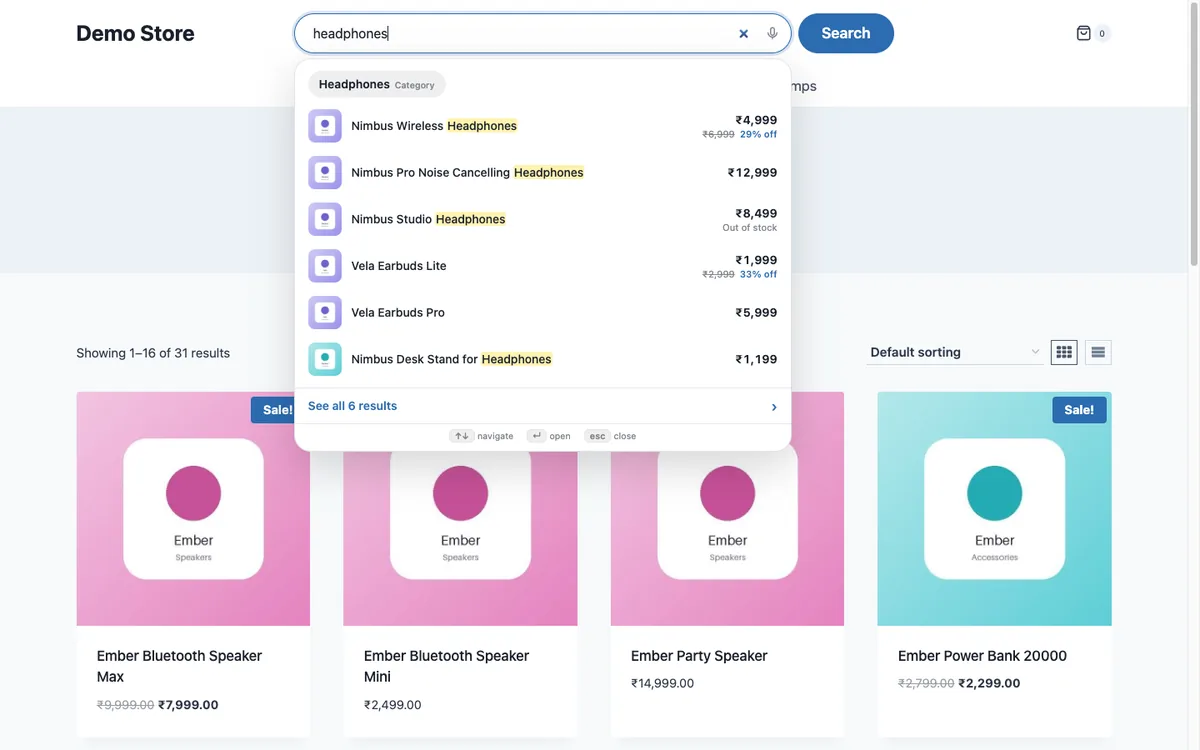
Lodestar Search has an Out of stock products option: show them like any other product, show them after in stock ones (the default), or hide them. The label appears in the dropdown beside the price, as you can see on the Nimbus Studio headphones below.
Lodestar Search is a free WooCommerce plugin with typo fix, synonyms and instant results.
Get the free plugin
Questions
Should I hide out of stock products from search?
Usually not. Showing them lower keeps the shopper informed and lets you offer an alternative.
Does the WooCommerce out of stock setting affect search?
Yes, but it also hides the product from shop and category pages, so it is not a search only choice.
Will showing sold out products hurt conversion?
It can if they rank first. Ranking them after in stock products avoids that.